Appearance
Your First Template
The Quickstart section uses a pre-built default template from Papermill. To control how your PDF looks - branding, layout, typography, headers, footers - you'll create your own. Papermill templates are written in Press, Papermill's powerful document language.
A Simple Template
Here's a simple one-page template that incorporates body text sent to the API:
xml
<press>
  <document>
    <page format="a4" page-margin="2cm">
      <h1>A Simple Document</h1>
      <flow name="body" />
    </page>
  </document>
  <flows>
    <body></body>
  </flows>
</press>
The <press> tag is the root tag in all Papermill templates. The <document> tag contains a sequence of pages that make up the document. The <flow> tag is a placeholder that says "content will be inserted here on this page". The content inserted in this case comes from the <flows>-><body> tag.
When markdown is sent to the API and tagged as the body flow, it will replace the empty <body> in the template and Papermill will "flow" the content into your page.
You can learn more about flows and other features of the Press language in Core Concepts.
Create the Template
To add the template to your account, log in to Papermill editor and click "New" from the file menu.
Give your template a name and paste in the example above. The preview on the right will show an A4 page.
Copy the Template ID
You can grab the template ID from top-right of the editor.
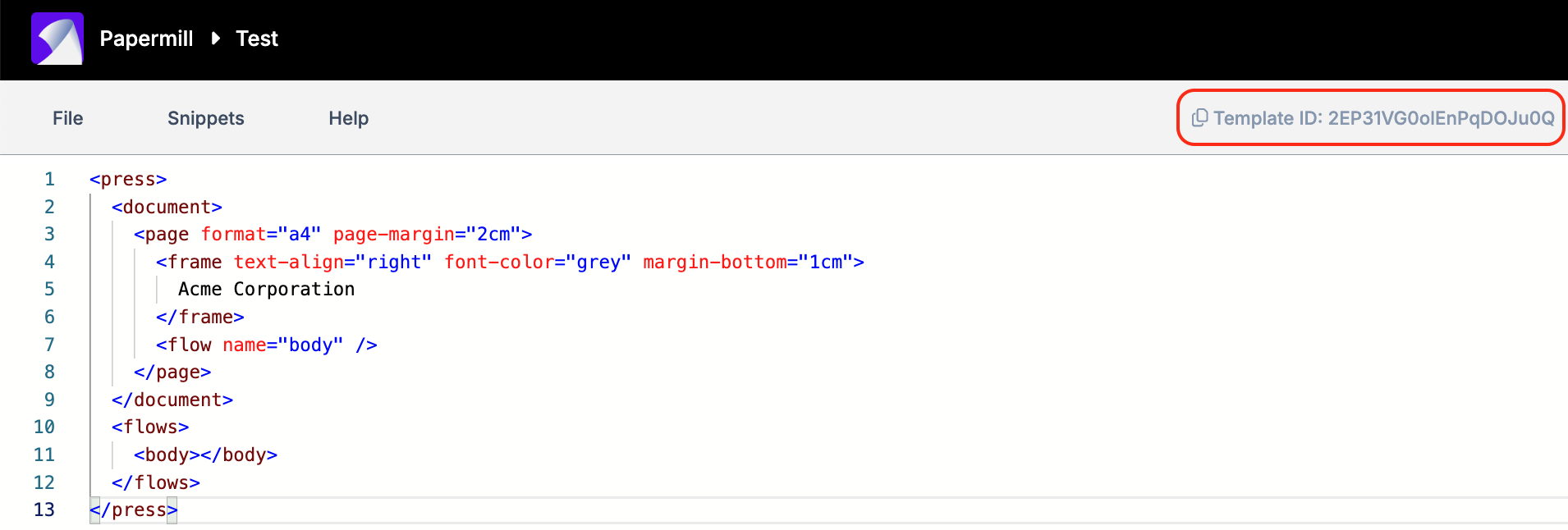
Store the template ID in an environmental variable:
export TEMPLATE_ID=...
Generate Documents using your Template
You can now use cURL or your programming language to create your PDF using your template ID and API Key. If you haven't already setup your API key, you can find instructions in the quickstart.
shell
curl -X POST "https://api.papermill.io/v2/pdf?template_id=$TEMPLATE_ID" \
  -H "Authorization: Bearer $PAPERMILL_API_KEY" \
  -H "Content-Type: text/markdown" \
  -o first_template.pdf \
  --data-binary @- <<EOF
# Q3 Revenue Summary

Quarterly performance across our core product lines.

| Product       | Revenue      | Growth |
|---------------|--------------|--------|
| Platform      | £482,000     | +18%   |
| Add-ons       | £124,000     | +42%   |
| Services      | £67,000      | -3%    |
| **Total**     | **£673,000** | **+19%** |

Strong quarter overall, driven by add-on adoption.
EOF
python
import os
import requests

API_KEY = os.environ["PAPERMILL_API_KEY"]
TEMPLATE_ID = os.environ["TEMPLATE_ID"]

markdown = """# Q3 Revenue Summary

Quarterly performance across our core product lines.

| Product       | Revenue      | Growth |
|---------------|--------------|--------|
| Platform      | £482,000     | +18%   |
| Add-ons       | £124,000     | +42%   |
| Services      | £67,000      | -3%    |
| **Total**     | **£673,000** | **+19%** |

Strong quarter overall, driven by add-on adoption.
"""

response = requests.post(
    f"https://api.papermill.io/v2/pdf?template_id={TEMPLATE_ID}",
    headers={
        "Authorization": f"Bearer {API_KEY}",
        "Content-Type": "text/markdown",
    },
    data=markdown.encode("utf-8"),
)
response.raise_for_status()

with open("first_template.pdf", "wb") as f:
    f.write(response.content)
javascript
import fs from 'node:fs/promises'

const API_KEY = process.env.PAPERMILL_API_KEY
const TEMPLATE_ID = process.env.TEMPLATE_ID

const markdown = `# Q3 Revenue Summary

Quarterly performance across our core product lines.

| Product       | Revenue      | Growth |
|---------------|--------------|--------|
| Platform      | £482,000     | +18%   |
| Add-ons       | £124,000     | +42%   |
| Services      | £67,000      | -3%    |
| **Total**     | **£673,000** | **+19%** |

Strong quarter overall, driven by add-on adoption.
`

const response = await fetch(`https://api.papermill.io/v2/pdf?template_id=${TEMPLATE_ID}`, {
  method: 'POST',
  headers: {
    Authorization: `Bearer ${API_KEY}`,
    'Content-Type': 'text/markdown',
  },
  body: markdown,
})

if (!response.ok) {
  throw new Error(`${response.status} ${response.statusText}`)
}

const buffer = Buffer.from(await response.arrayBuffer())
await fs.writeFile('first_template.pdf', buffer)
Customising your Template
You can now make changes in the editor and they'll be reflected in the PDF returned from the API. Let's add a simple header into the top margin:
xml
<press>
  <document>
    <page format="a4" page-margin="2cm">
      <frame text-align="right" font-color="grey" margin-bottom="1cm">
        Acme Corporation
      </frame>
      <flow name="body" />
    </page>
  </document>
  <flows>
    <body></body>
  </flows>
</press>