Appearance
Rotations
Blocks may have a rotation attribute. Rotations are performed in-place, about the top-left corner of the block: position (0, 0). rotation supports the following values (in degrees):
- 90
- 180
- 270
A rotated block can change the width and height available to its children, depending on the rotation. The width and height attributes of the block are always pre-rotation, but other attributes are post-rotation. This means that a wide, short block will still be wide and short if rotated by 90deg, but the available space to the children is now thin and long (width and height are flipped). Let's see how a rotated frame looks. Here's a frame with a different coloured top border:
xml
<frame border-weight="5pt" width="100pt" height="50pt" border-color="black" border-color-top="red" />Now let's apply a 90deg rotation:
xml
<frame border-weight="5pt" width="100pt" height="50pt" border-color="black" border-color-top="red" rotation="90" />Notice that the width and height of the frame hasn't changed, but the top border is now on the right.
Rotated content
Let's add content to this frame:
xml
  <frame border-weight="5pt" width="100pt" height="50pt" border-color="black" border-color-top="red" rotation="90">
    Hello, world!
  </frame>
Hello,
world!
world!
The text has now wrapped in a different place due to the changes in dimensions. Rotating a frame also changes the automatic width and height calculations used to render frames in the general flow of a document. Let's take a look at how this impacts how elements flow together:
xml
  <frame border-weight="5pt" border-color="black" border-color-top="red" rotation="90">
    I'm the parent 90deg rotation
    <frame border-weight="5pt" border-color="blue" border-color-top="orange" rotation="90">
      I'm a 90deg rotation inside a 90deg rotation.
    </frame>
  </frame>
  <b>Frame 1</b>: Two rotations where the space is automatically computed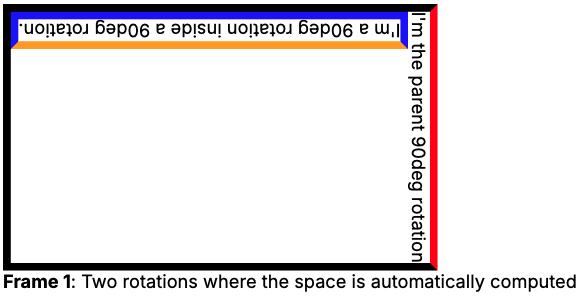
We've removed the hard-coded width and height attributes here and can note a few things:
- In the parent 90deg rotation, the text starts increasing the height of the frame. It will keep increasing the height until it runs out of text or has to wrap the text due to height limitations
- In the child 90deg rotation (180 in total), we're back to increasing the width of the frame. However, this is now aligned at the top of the overall frame as we rotate around (0, 0) of the already 90deg rotated frame.
If we wanted to align this internal box (180deg rotation total) with the bottom of the frame, we'd need to think in 90deg rotated space. Then we'd set the h-align property to right on the parent 90deg rotated frame:
xml
  <frame border-weight="5pt" border-color="black" border-color-top="red" rotation="90" h-align="right">
    I'm the parent 90deg rotation
    <frame border-weight="5pt" border-color="blue" border-color-top="orange" rotation="90">
      I'm a 90deg rotation inside a 90deg rotation.
    </frame>
  </frame>
  <b>Frame 1</b>: Two rotations where the space is automatically computed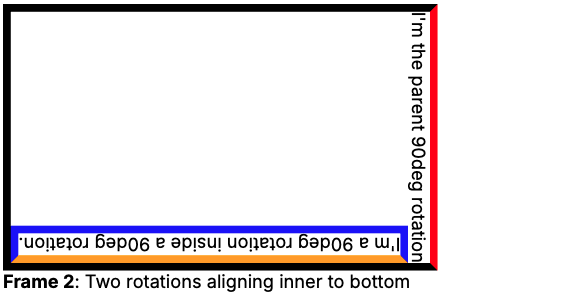
The above shows that the children of a frame actually do not consider themselves rotated, they act as if they were a normal part of the frame. This means that any frame can be rotated in Papermill and will seamlessly compute the space it needs and whether it fits in a containing frame or page. The advantage of this is that rotations can be useful for e.g., a table which will not fit horizontally on a page, but will fit vertically. With rotations, we remove the need to rotate a whole page to landscape, as just a single frame can be rotated.